
- Digital certificate downloads in Internet Explorer 11
- Customers provide input into LINZ website refresh
- Finding dealings/requests in workspace
- The effects of changing the order of registration, or adding documents or titles to an e-dealing
- Scanning and attaching documents in Landonline
- Height order changes
Issue 112
Digital certificate downloads in Internet Explorer 11
Please note that the Landonline DC Loader Wizard is not currently compatible with Internet Explorer 11.
In most cases this combination will result in an incomplete or corrupted DC installation. Our Landonline service provider is working on a solution to this issue. In the meantime if it is not practical for you to avoid the use of Internet Explorer 11, please follow the manual download and installation instructions. This is a more complex process, but it avoids the inconvenience and time delays associated with a corrupted DC installation and any consequential requirement for DC code replacement. If you require further information or assistance on this matter please contact Customer Support on 0800 665 463.
Update as at 1 January 2015: A new version of the Landonline DC Loader Wizard is now available which resolves this issue. Please download DC Loader Wizard v3.0.0.14 (//www.linz.govt.nz/land/landonline/digital-certificates-and-security/download-or- renew-your-digital-certificate) .
Customers provide input into LINZ website refresh
Customers have been given the opportunity to provide feedback on a design refresh of the LINZ website. We have sent out invitations for three sessions:
The first was held in Christchurch on Monday.
The second is being held in Hamilton tomorrow (Thursday 25 September) from 4.30pm to 5.30pm. And the last one is being held in Wellington on Tuesday 30 September from 4.30pm to 5.30pm.
The refreshed site, due to be launched later this year, is all about making it easier for you - our customers - to find the information you need from LINZ.
A key part of the refresh is that the Landonline and LINZ sites will be merged, reducing the need to go back and forth between the two sites for information. The Landonline log in page and the way Landonline works will not change. You will also continue to receive your monthly Landwrap email newsletter, with a new look and feel to match the refreshed site.
Other changes are:
- audience landing pages have been created for surveyors, and for lawyers and conveyancers, so all the information you need is in one place.
- the site search will return more accurate results thanks to an improved search engine and better metadata
- we’ve included a Knowledge Base, which will hold technical information around the property surveying and transaction processes.
- the site will have a more contemporary look and feel.
Find more information about the website refresh (//www.linz.govt.nz/website-refresh) and view the updated project video (//www.linz.govt.nz/osi/refresh) so you can see how the refreshed site will work and how it will look.
If you have a question, please feel free to contact the Digital Services team (mailto:DigitalServices@linz.govt.nz? subject=Website%20refresh) at LINZ.
Finding dealings/requests in workspace
Since the 3.10 release, if you use the Find dealing / request screen to find a dealing belonging to another staff member in your firm, when you click the select button it now takes you to that person in the Workspace Tree but does not put focus on the dealing as it should.
This will be fixed in the next maintenance release (Release 3.11) currently proposed for May next year. In the interim you can easily achieve the desired result using the following steps:
- Search for the dealing using the Find Dealing / Request screen.
- In the Search Results area, right click the Dealing and select 'Highlight in Tree' as shown below. The Workspace Tree will then update to display the highlighted dealing.

The effects of changing the order of registration, or adding documents or titles to an e-dealing
The order of registration of instruments is important as it affects the Authority and Instruction (A&I) forms and certifications. Special care should be taken to ensure the dealing is set up correctly.
If the order of registration of instruments changes or new documents and titles are added to an e-dealing, the Conveyancing Professional (CP) should review the existing A&Is to ensure they continue to authorise the instruments being registered. Where necessary the CP may need to:
- have the existing authorities amended by the client to incorporate any changes made,
- amend the instrument and reimage in Landonline to ensure the affected parties are recorded correctly, or
- obtain new authorities where the changes have resulted in different parties being affected by the transaction.
As always, it is essential that the Conveyancing Professional has certified on behalf of the correct party and holds appropriate evidence to support his/her certifications pursuant to s164C Land Transfer Act 1952.
New title dealings are common transactions where the order of registration is changed and where new documents and titles are added. To minimise rework, the following instruments should be lodged in the same dealing prior to the Order for New Certificate of Title (OCTN):
- 223 & 224 certificates (if not already attached to the Cadastral Survey Dataset (CSD (http://landonline.govt.nz/about- landonline/newsletter/landwrap/201209/c223224-rma-certificates-%E2%80%93-when-include-part-dealing) ),
- discharges of mortgages as to lots vesting or parts being transferred, and
- transfers to bring parts of the land into common ownership e.g. a Transfer of part of the land in a 'Head Title' to effect a boundary adjustment.
Instruments affecting the new lots on the plan, such as easements, should be lodged in the same dealing after the OCTN.
The Subdivision Checklist below is available to support staff during their preparation, checking and certification of e-dealing instruments.
File Attachments
Subdivision checklist (https://www.linz.govt.nz/system/files_force/media/file-attachments/lol_form-subdivision- checklist_20180413.pdf?download=1) PDF | 288.91 KB
Scanning and attaching documents in Landonline
Much registration in Landonline involves scanning and uploading documents which, when registered, will become part of the Land Transfer Register and embody the rights and responsibilities described within the document. Here's how to ensure your image quality meets the required standards.
It is important that scanned documents are clear and easy to read – both on a screen and when printed. If a document does not meet these criteria for registration, LINZ will ask the practitioner to improve the image quality of the document.
Section 28 of the Land Transfer (Computer Registers and Electronic Lodgement) Amendment Act 2002 covers this. Section 28 enables LINZ to requisition or reject an electronic instrument because of a poor quality image.
| Landonline process | Types of attachment accepted |
|---|---|
| e-survey and TA | TIFF, PDF, JPG |
| e-dealing | TIFF, PDF |
| Requests (all users) | TIFF, PDF, JPG |
The best settings for Landonline
Our preferred format is TIFF because Landonline converts PDF to TIFF format, which reduces the quality of the image. When you scan your documents to upload to Landonline, the best settings are:
Format: TIFF
Compression: CCITT G3 or G4
Resolution: 150-300 dpi (the higher the resolution the better)
Colour: Black and white images only
Check out Landonline scanning requirements (//www.linz.govt.nz/kb/800) for full details.
Scanning to PDF
If you must scan to PDF format, then scan in black and white. The conversion to TIFF will be clearer if the PDF image is black and white, even if the original document is black and white. You should have scanner setting similar to the following screenshot.

Tools to help you
If you are having difficulty in getting your image into the correct format, there are a number of ways to convert your existing file.
The first option is to download the Landonline Print-to-TIFF driver (//www.linz.govt.nz/kb/843) , and use that to convert your images. The Software Downloads page (//www.linz.govt.nz/land/landonline/system-support-and-software-downloads/software- downloads) also has further information about the Landonline installation.
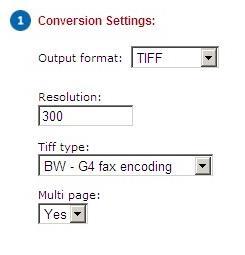
Alternatively you can use an online file conversion tool, there are a number of these available and the following steps provide just one example:
- Go to: http://docupub.com/pdfconvert/ (http://docupub.com/pdfconvert/)
Set conversion settings as per screenshot (right)
- Browse for file to be converted.
- Choose the delivery method: The default option 'Wait for conversion in browser' will open another screen with a link to download the converted file.
- Click the 'Upload & Convert' button
- Download the converted file.

Related Content
Landonline Print-to-TIFF Driver (/kb/483)
Height order changes
On 2 September 2014, nearly 10,000 normal-orthometric heights had their orders reclassified from 2V to 3V.
This better reflects the expected accuracy of these marks. The heights themselves have not changed.
These heights were originally captured from SO plans, mostly in the Auckland area. They were loaded into the Geodetic Database ten years ago and assigned Order 2V. A recent review of some of these heights identified that Order 3V would be more appropriate, particularly since the original observations are not available in digital form for rigorous testing against the accuracy standards. For traceability reasons, the heights with their previous 2V classification remain in the Geodetic Database. They can be viewed by selecting the 'Historical values' link to the far right of the height on the 'Mark details' page for an individual mark.
For any queries please contact the National Geodetic Oice (mailto:CRM_Geodetic@linz.govt.nz) .
Media contact
Email: media@linz.govt.nz