
About QGIS and the LandXML plugin
QGIS is a free, open-source GIS application for data manipulation, visualisation and analysis.
Visit the QGIS Project website for help and to download the application:
QGIS Project
The Landonline LandXML plugin has been developed by Toitū Te Whenua LINZ. Background information on the plugin can be found in the QGIS Plugin Repository:
QGIS Plugin Repository - LandXml import plugin
How to install the LandXML plugin
The example below has been carried out using QGIS version 3.44.2.
- Open QGIS.
From the menu select Plugins, then Manage and Install Plugins....
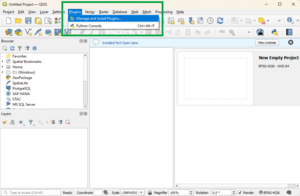
Search for ‘LandXML’ in the search bar.
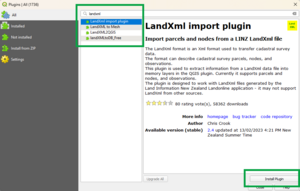
- Select LandXML import plugin from the list.
- Select Install Plugin.


Install note:
If you cannot connect to the plugin repository, you may need to use a proxy server for web access. You can enter your proxy details at Settings > Options > Network.
How to run the LandXML plugin
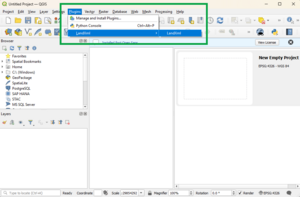
Once installed, LandXML will appear as a plugin in your Plugins menu. To import your LandXML files:
From the main menu, select Plugins, then LandXML, then LandXML .
From the dialog box, select Browse to locate your LandXML file.
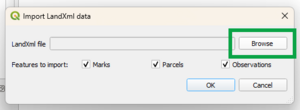
- Once your file is selected, choose to import:
- Parcels
- Marks
- Observations.
- Select OK.
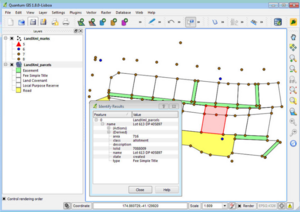
Depending on the options you selected, the LandXML_parcels and/or LandXML_marks and/or LandXML_observations layers will be added to the map project. You can then style the layers using QGIS's layer properties dialog.
The example shown below is styled using the "categorized" style to identify different mark orders and parcel types (note that this screenshot is from QGIS version 1.8.0).


LandXML plugin running notes:
The data are loaded into QGIS "Memory” layers. The content of these memory layers does not persist after you close QGIS.
To save the LandXML data in your project, you can either:
- right click on the layer and select “save as” to save to a format on disk (such as Shapefile or SpatiaLite), or
- you can install the “MemoryLayerSaver” plugin, which will automatically save the content of memory layers.
We highly recommend using the “MemoryLayerSaver” plugin.
Feedback on LandXML plugin
If you have any feedback about the LandXML plugin, please raise an issue in GitHub