
Diagram of TA certification process
The diagram below shows the process for a territorial authority (TA) certification in Landonline:
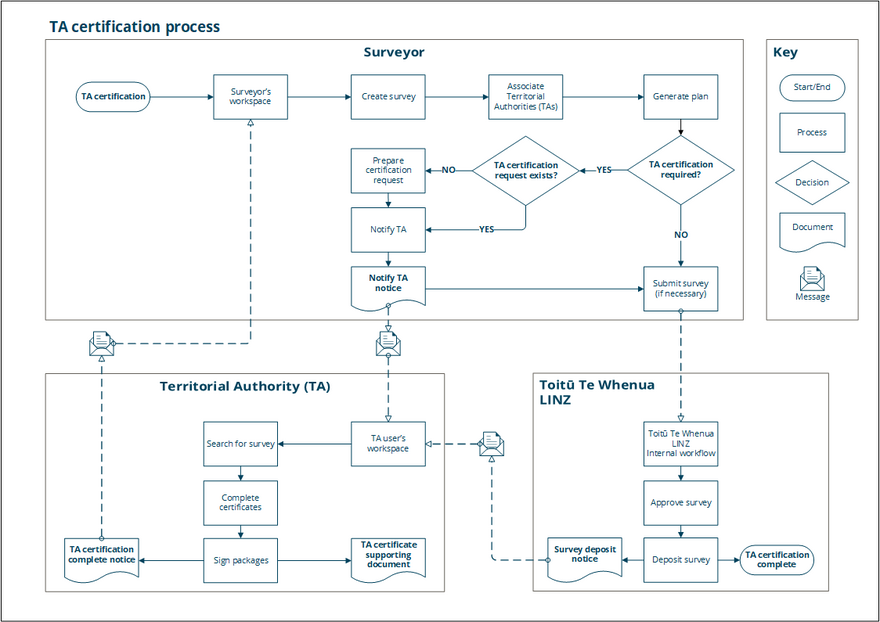
You can view and download a full-size version of the TA certification process diagram as PDF here:
TA certification process in Landonline
Surveyor
In your Landonline workspace:
- Create the survey, including adding survey details and spatial capture.
- Associate the relevant territorial authorities (TAs) to the survey.
- Generate your plans in Plan Generation.
If TA certification is not required, then complete and submit the survey when you are ready to do so.
If TA certification is required, then:
- Check whether a TA certification request already exists.
- If no, prepare the certification request, then continue to step 3.
- If yes, you can notify the TA.
- Landonline creates a Notify TA notice and sends it to the relevant TA.
- You can submit the survey when you are ready to do so.
Territorial Authority (TA)
Once you (the surveyor) have notified the TA, in the TA user’s Landonline workspace they:
- Receive the TA certification request notice.
- Locate the survey in Landonline and start working on the TA certification request.
- Complete the certificate(s) in the request.
- Sign the package(s).
Landonline creates:
- a TA certificate supporting document and attaches it to the survey
- a TA certification complete notice and sends it to the signing surveyor.
Fo details on how to complete TA certification if you are a TA user, see:
Grant TA Certification support
Toitū Te Whenua LINZ
Once the survey is submitted, it goes into Toitū Te Whenua LINZ internal workflow for processing and validation.
- When validation is complete, the survey is approved.
- Once the associated dealing is complete, the survey is deposited.
- Landonline creates a Survey deposit notice and sends it to the relevant TA(s).
- TA Certification is now complete.