
See also:
Known issues in Plan Generation
Unable to inspect and adopt marks or vectors in offshore islands
June 2026
When manually capturing a survey in the offshore islands, for example Chatham islands, you may not be able to inspect or adopt underlying marks, vectors, or lines.
Note: This issue won’t occur if you have imported an XML file into the area.
To enable mark and vector adoption:
- In the Existing parcels panel, add the underlying parcel(s) as Extinguished or Referenced (as applicable)
- In the Survey details panel, ensure the correct Meridional circuit is selected.

- In the Layers panel, turn on Underlying Marks and/or Vectors layers as needed.
- Select the Inspect and adopt tool.
- Underlying marks and vectors can now be selected for adoption.

Creating marks with no CSD reference
June 2026
When you use Add mark to create a new mark in the marks panel, it auto-populates with details from the last mark in the panel, including the CSD reference. Once a CSD reference has been added to a mark, it can only be edited, not removed.
If you need to create a mark with no CSD reference, you will need to:
- find an existing mark in Landonline that also has no CSD reference
- adopt the mark.
- unlink the mark and edit its Name and details as needed.

Tip: To help you find an existing mark with no CSD reference, turn on the Underlying marks layer, and the Underlying marks labels. You can then look for underlying marks that display:
- mark name with no CSD reference, for example K68
- Node ID instead of a name, for example Node ID 25495232. This will appear in the Marks panel as DCDB.

Georeferenced images reverting to opaque
May 2026
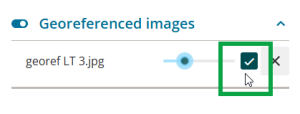
If you adjust the image opacity for a Georeferenced image when the Layers panel is “popped-out”, it incorrectly reverts to 100% opacity as soon as your mouse returns to the spatial view.

Workarounds:
- Don’t use a popped-out Layers panel when working with georeferenced images in your survey.
If you do use the popped-out Layers panel, change the opacity, then toggle the layer off and back on before moving your mouse outside the panel.

Duplicated vectors error message not fully displaying
January 2026

The Duplicated vectors error message may sometimes display without all details visible. This occurs when there are a high number of duplicated observations reported.
You won’t be able to see:
- the error message details at the top of the message
- all listed observations
- the OK button at the bottom of the message.
To view the full error message, you will need to reduce the zoom in your browser.
How to reduce browser zoom:
- Maximise your browser window, then reduce the zoom level of your browser to allow the full error message to display. Either:
- Position your mouse anywhere in the browser window and hold CTRL on your keyboard while scrolling your mouse wheel towards you.
- Click into the window to make it active, then hold CTRL and click – (minus) on your keyboard.
Adjust the zoom in your browser menu.
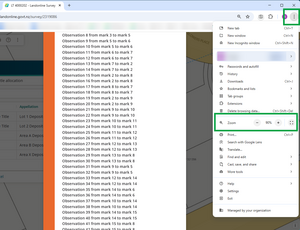
Adjust the zoom in the browser address bar.



Once you can view the entirety of the message:
- Identify all the duplicate vectors in the list. You will need to delete 1 set of each duplicate.
Tip: Take a screenshot of the message as you won’t be able to make any edits while the message is open. - Select OK to close the message.
- Once all duplicate vectors are addressed, relink your parcels.

Future enhancement fix:
LINZ are investigating adding a scroll bar to the message so you will be able to view all details without reducing browser zoom.
All labels toggle doesn’t hide all labels in capture
September 2025
The Labels toggle in the Layers panel doesn’t hide all labels when switched to off.

You will need to toggle Labels to on then untick each label type individually to hide them.

Renewed or disturbed mark not saving details as expected
May 2025
When you record details of a renewed or disturbed mark in the Marks panel, sometimes Landonline doesn’t save it correctly, leading to a pre-validation error preventing submission.
A correctly saved renewed mark is shown below.

After selecting the node ID or entering the name of the renewed or disturbed mark, and selecting Continue, occasionally the renewed or disturbed mark name is not retained in the Condition field.
If this occurs, change the Condition back to Reliably Placed and remove the Description. Once saved, try capturing the mark as renewed/disturbed again.

For details on how to capture a renewed mark, see:
Record a renewed or reinstated mark
For details on how to capture a disturbed mark, see:
Record a disturbed mark that has previously been recorded in Landonline as reliable
Water and Irregular boundary XML import issue
March 2024
Some users have reported an issue when importing XML files created in Liscad that have water or irregular boundaries.
If you are having difficulties importing your file, please call customer support on 0800 665 463 or email customersupport@linz.govt.nz
Spatial Displacement when working in the Chatham Islands
March 2024
When capturing a Survey in the Chatham Islands and working at maximum zoom level there appears to be a displacement of data between a linked survey mark and the underlying mark to which is linked. The coordinates stored in the database for the linked mark and the underlying mark are exactly the same, and the displacement is purely visual.

Inactive user associated to plan not showing
February 2024
Currently inactive users are not being shown in the enabled users’ panel, this is causing issues for firms that are wanting to remove users.
Please call customer support on 0800 665 463, provide a list of plans that the inactive user is associated to, have a case raised and assigned to the Landonline Application Specialist team who will remove them on your firm’s behalf.
Y027 rule preventing submission - Automated Schedule/Memorandum with Common property
November 2023
If the Y027 rule does not pass at pre-validation, even after updates are undertaken to bring in amended parcels from capture etc., look out for the presence of ‘Common Property’ under the Burdened Land (Servient Tenement) field.

Until this is fixed you will need to:
- Save your automated Schedule/Memorandum to your computer by using the Download as PDF function and then attach it as a manual Supporting Document.
See: Download the schedule / memorandum as a PDF - Delete the automated version attached (don't replace it), then re-run pre-validation.
Renaming of TA Certification package
November 2023
An issue occurs when a TA certification package is renamed, when a user attempts to create an additional package, the below error appears.

As you cannot update the TA certification package name in New Landonline the workaround is:
- ask the TA certifier to change the certification package name back to the original on your behalf
- call customer support on 0800 665 463 or email customersupport@linz.govt.nz.
Reverse tick box carried through from Legacy
November 2023
If your Survey was created in Legacy Landonline and a ‘reverse’ tick box had been selected on a vector, when you add a new vector in New Landonline it will retain the reversed direction for any subsequent vectors copied from a row where the reverse selection was applied.
As the reverse tick box is not an option in New Landonline the work-around is:
- if you know which vector was set up as reversed in Legacy Landonline, you can delete it and manually re-capture it in New Landonline.
- call customer support on 0800 665 463 or email customersupport@linz.govt.nz
Placeholders disappearing on large Surveys
October 2023
Some users have reported experiencing placeholders disappearing when being used on their survey in Landonline.
While we are investigating this issue as a workaround, please raise an exception request to get the Landonline data moved.
Multiple selection tool unable to complete requested action on large number of features
September 2023
When bulk selecting marks, lines, vectors and parcels to be deleted, unlinked or adopted at one time, you only have the ability to select and action up to around 400 features at once.
There is currently a 45 second connection timeout, which then presents an error.

If you encounter an error when updating or deleting a large number of features, a workaround is to refresh your browser or exit the survey and open it again. If the features that were selected have not updated as expected, select a smaller group, and try again.

C640 incorrectly warns that a connection has not been made to a cadastral survey network mark (CSNM)
Landonline release 3.24
Landonline business rule C640 tests whether the survey connects to a CSNM as required by CSR 2021 r 17(1). It also tests that the connection has been made by adoption or measurement r 17(2).
To satisfy rule 17(1)(a), only 1 of the qualifying boundary marks has to be connected by 1 or more vectors to a CSNM within the 1000m limit.
Where there is a combination of captured CSNMs both inside and outside of the 1000m limit, sometimes Landonline will produce a pre-validation warning indicating that 1 or more CSNMs have not been connected to, when a valid connection has been made.
Where business rule C640 has failed and you have correctly recorded a measured or adopted connection by 1 or more vectors to a CSNM as required by CSR 2021 r 17, you should make a note in the survey report to address the pre-validation warning.
Survey report content clears when running pre-validation to convert RCS 2010 CSD to CSR 2021
Landonline release 3.24
For datasets captured prior to 25 February 2022 and not lodged, you need to run pre-validation to convert the dataset into CSR 2021.
- This will change the survey report from RCS 2010 to CSR 2021.
- This action will clear all previously entered content in the survey report.
As Legacy Landonline is now switched off, there is no way to retrieve the original survey report content. You will need to complete a new survey report.
CSNM/VCM can be captured as ‘New’ marks in Landonline even though this is not allowed under CSR 2021
Landonline release 3.24
If you create a CSMN/VCM mark as state New, there is no symbology for this and so it takes on the appearance of an Old CSNM/VCM (solid triangle).

There are no rules run at pre-validation to check this.
Check the Marks panel to ensure CSNM/VCM marks are only captured with a Mark State of Old or Adopted. Edit these if Mark State is set as New.
Note: An orange warning triangle displays in the Mark Purpose and Mark State fields to indicate that the Mark State needs to be edited.

Y027 preventing submission at Pre-validation, even though the automated Schedule/Memorandum is complete and matches capture
Landonline release 3.20

Y027: Some parcels have been removed. Ensure the automated Schedule / Memorandum is updated and re-attached.
See also: Y027 rule preventing submission - Automated Schedule/Memorandum with Common property
This Y027 rule indicates that captured parcels have been removed from spatial capture or the parcel list (or both). These parcels may have been in the original Schedule/Memorandum (possibly already attached as a Supporting Document), but do not display in the current Schedule/Memorandum anymore.
When you check the Schedule/Memorandum panel, there are:
- orange warning triangles in fields where the parcels that were initially captured have been removed, and
- the original parcel id, which no longer exists as it was deleted.

If you have a copy of the original schedule/memorandum you can identify:
- what the parcels were
- what the parcels should be now.
Double-click in the field(s) with the orange warning triangle, and select the appropriate parcel from the drop-down list to re-populate the field.

Once the rows have been updated:
- Ensure you re-attach the schedule/memorandum as a supporting document.
- Re-run Pre-validation to ensure the Y027 rule passes.