
For a PWSI CSD you can choose whether to:
- use the Survey sheet created with the System Generated Traverse Diagram (SGTD)
- delete the Survey sheet from your layout sheets. The non-boundary dimensions can then be manually added to your Title sheets as user-added text.
For more information about Parcels without survey information CSDs, see the Cadastral Survey Guidelines:
Capture and depiction - Parcels without survey information CSD
To delete the survey sheet from your layout sheets:
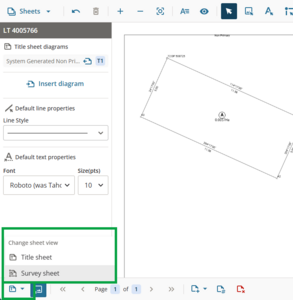
In Plan Generation layout sheets, left-click on Change sheet view at the bottom left corner of your screen and select Survey sheet.
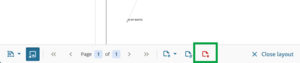
In the Page control panel at the bottom of the screen select Delete page.
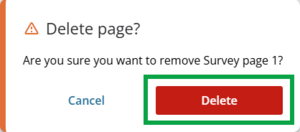
A pop-up message appears. Select Delete to confirm deletion.
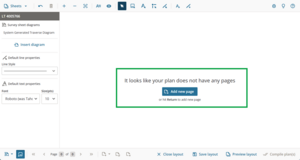
The Survey sheet view will display “It looks like your plan does not have any pages”, and no survey sheet will generate when you compile your plans.
- Left-click Change sheet view and select Title sheet to return to the Title sheets.


You can re-add a survey sheet and add the SGTD if you later change your mind.
For help with adding user-added text and lines to your layout sheets, see: